Website + online galleries for photographers

Your photography website and client galleries — together in Visuals.

Show your portfolio, collect inquiries, and deliver finished photos and videos beautifully — without a separate site builder, drive, and proofing tool.

No card required3 GB free for galleriesWebsite and galleries separately or together
maria.visuals.com.ua
Website · Mriya
Website · Mriya
Online gallery
View a live website built with Visuals

What you get

One account. Two products. The complete client journey.

Your website helps clients find and choose you. Your online gallery turns delivery into a professional, branded experience.

Before the shoot · Website Builder

A website that turns visits into inquiries

Show your portfolio, services, and shoot stories, collect inquiries, and grow in search — on your own domain.

  • Multi-page website and 7 complete themes
  • Portfolio, journal, forms, and calendar
  • SEO, analytics, and a custom domain
Explore the website builder

Both products live in one account and can be purchased separately or as a better-value bundle.

1 accountfor your website, galleries, and client work
7 themesfor a complete multi-page photography website
10 languagesin the client-facing online gallery
∞galleries even on the free plan

Three working stories

Visuals adapts to the shoot, not the other way around

Here is how the website and gallery work together in three familiar photography situations — without vague promises or extra tools.

01

Wedding photographer

One brand from the first visit to the finished wedding story

A couple discovers the photographer through a journal story, explores complete series, and sends an inquiry from the website. After the wedding, they receive a branded gallery with a cover, photos, and video of the whole event.

There is less to explain in messages, while the couple's full journey feels like a continuation of the photographer's visual style.

  • Website, journal, and inquiry form
  • Photos, video originals, and selections
  • PIN, selections, and review
02

Portrait photographer

Clients select their frames without sending file numbers in chat

The client compares packages and books a convenient time on the website. After the shoot, they open a private gallery, add frames to a “For retouching” list, and leave feedback directly beneath the right image.

The photographer receives one final selection with the context for every edit, rather than piecing it together from voice notes and screenshots.

  • Services, packages, and calendar
  • Named selection lists
  • Comments on individual frames
03

Commercial photographer

Clients receive the right frames and formats without confusion

After a fashion shoot, the photographer brings the series into one gallery. The brand team selects frames and leaves comments, then receives the finished work at the right quality through a protected link.

Selections, feedback, and delivery stay together, so the team works from one agreed series.

  • Multiple selection lists
  • Comments on individual frames
  • Access and download controls

These are illustrative workflows based on shipped Visuals capabilities, not testimonials from real customers.

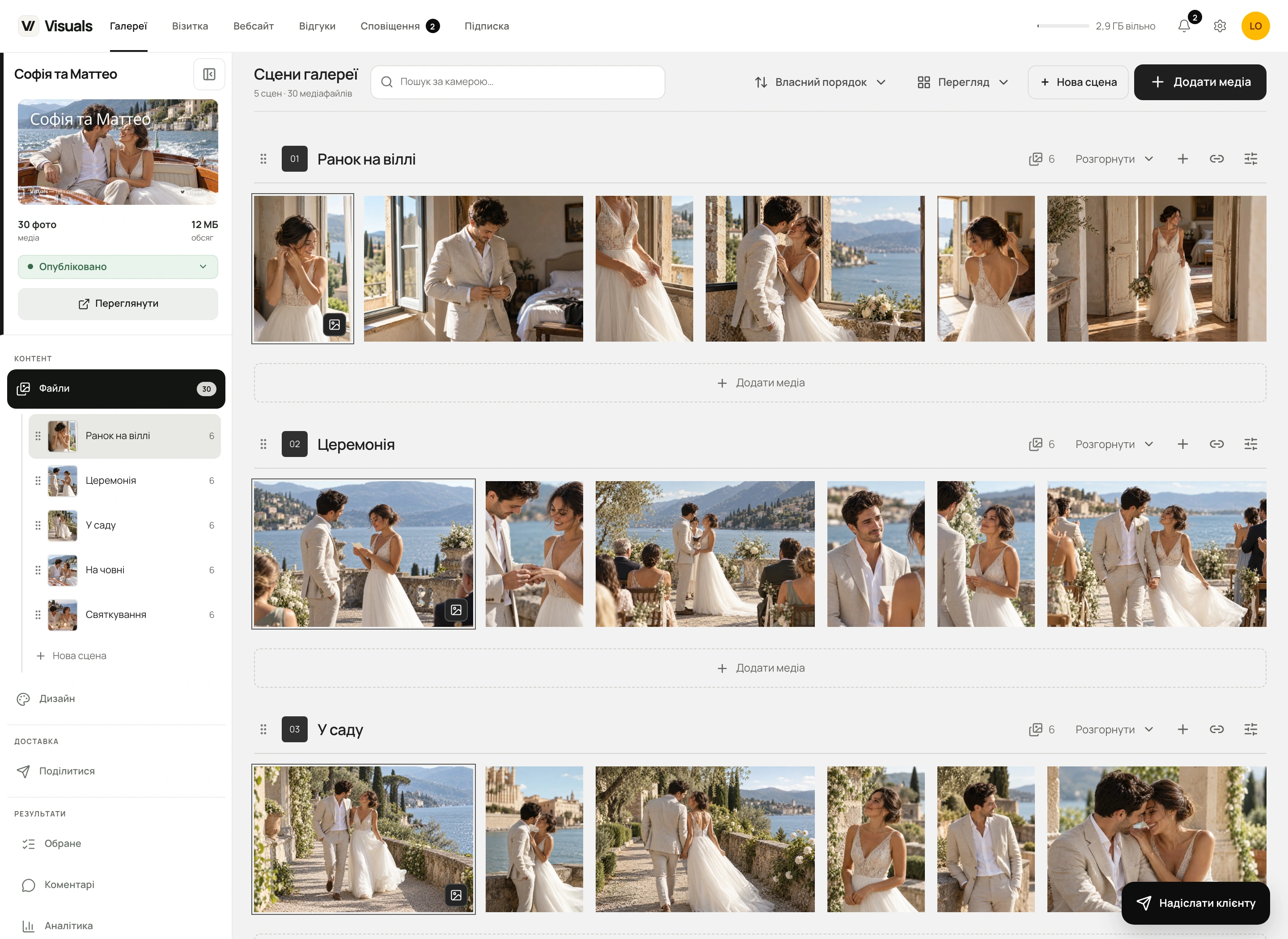
Scenes in online galleries

The whole shoot. Every story in its place.

From bridal preparations to the last dance, keep the shoot in one gallery and divide it into scenes. Photographers can organise their files, while clients can find, view and download the moments they want.

  • Upload straight to the right place
  • One photo or a whole selection, in one move
  • Your story, in your order
  • A cover that represents this scene
  • A direct link with your access rules
  • Download just the scene you need
How to set up scenes: a step-by-step video guide
The scene workspace in the real Visuals dashboard. Small view, covers in the sidebar and a separate Add media action for each scene.

Scenes, at a glance

What are scenes in a photographer’s online gallery?

They are sections within one client gallery, such as preparations, the ceremony, portraits and the celebration. Each scene can have a name, description, cover, its own crop and a direct link. They are not separate galleries.

How do I move several photos between scenes?

Select the photos and drag them together to the target scene, or choose “To scene” in the bottom bar. Files are not transferred to the server again, and favourites, selections and related data are preserved.

Explore online gallery features

Video in mobile galleries

Video that comes alive in focus.

On a phone, a clip plays right in the grid when your client pauses on it. No Play button or separate player to open — motion becomes part of the story alongside your photographs.

You can turn automatic previews off in gallery settings. Browser policy, reduced motion or data-saving preferences may keep playback manual.

  1. In focus — playing

    The preview starts when enough of the video is visible and it is near the center of the screen.

  2. Scroll on — it stops

    The video makes room for the next clip as soon as it leaves the viewing area.

  3. Muted. One at a time.

    Only one automatic preview plays at once. Open the video for full playback with sound.

Straight answers

What to know about Visuals

01Do gallery videos play automatically on phones?

Yes, with automatic previews enabled: pause on a video in the grid. One clip plays muted and stops after leaving the viewing area. Tap to open the full player with sound. If the browser restricts autoplay or reduced-motion or data-saving preferences are enabled, manual playback remains available.

02Which languages does Visuals support?

The photographer dashboard, website editor and starter website content support Ukrainian, English, Polish, German, French, Italian, Spanish, Dutch and Czech. Client galleries and business cards support these languages plus Turkish.

03What can I customize in a client gallery’s design?

Each gallery has its own choice of 2 themes, 6 background and accent palettes, 12 fonts, and 10 cover options, including no cover. Adjust the crop, focal point, dimming, and heading typography; choose grid, masonry, or justified layouts, columns, gaps, image ratios, and grid width. Set a separate cover, crop, heading style, and grid for phones.

04How do I use client selections in Lightroom or Capture One?

Clients save photos to favorites or named lists, leave comments, and submit a finished selection when you enable it. Copy selected filenames for Lightroom or Capture One, export a CSV, or download a ZIP of the chosen list.

05Do photographers get detailed statistics for every visitor?

Statistics show openings, unique browsers, visits and actions without linking them to a guest’s name or email. Visuals currently collects its own statistics automatically in every country without an initial prompt. Previously saved refusals and GPC and Do Not Track signals are respected. A browser is not necessarily one person, and blocked requests do not reach the report. Google Analytics and Meta Pixel have separate permission settings.

06What is Visuals?

Visuals is a platform for photographers to build a public website, collect inquiries, and deliver branded online galleries with photos and videos to clients.

07Can I use online galleries without a website?

Yes. Online galleries are a standalone Visuals product with free and paid plans. Deliver shoots, customize the design, collect selections, and control downloads even if your website is already on another platform. You do not need to build a website in Visuals.

08Can I build a website without galleries?

Yes. The builder has its own media library, forms, journal, booking calendars, service blocks, and more. Galleries simply make portfolio population faster.

09What is included on the free plan?

3 GB for unlimited online galleries, client selections, and PIN protection, plus Website Starter with up to three pages on a Visuals subdomain and a Visuals badge. No card is required.

10Can I connect my own domain?

Yes. Connect your website domain with Website Pro, on its own or in a gallery bundle. Visuals verifies DNS, provides HTTPS, and generates canonical, robots.txt, and sitemap.xml. Custom gallery domains are planned.

11What website SEO tools are included?

Pages are server-rendered. You can set titles and descriptions for the site, pages, and posts, plus Open Graph, robots, canonical URLs, sitemaps, alt text, clean URLs, RSS, and structured blog data.

12How does Visuals protect photos and videos?

You can separately restrict viewing and downloads with PINs, set an expiration date, and apply server-rendered watermarks to photos and videos.

13Which photo and video formats does Visuals support?

Galleries accept JPG/JPEG, PNG, HEIC/HEIF, WebP, TIFF, AVIF, GIF, BMP and JPEG XL, plus RAW on every plan, including Free. Video: MP4, MOV, M4V, WebM, MKV, AVI and 3GP with compatible codecs. Each photo or RAW file can be up to 500 MiB; each video up to 5 GB. Originals stay unchanged. Viewing copies are JPEGs, so GIF previews are static and transparency is flattened onto a background.

14Can I pay for a Visuals subscription from the EU?

Yes. Photographers in the EU and other supported countries can pay for Visuals subscriptions through Paddle. The country of residence saved in your account determines the currency; the final total including tax is shown before payment. Monobank is the standard payment option in Ukraine; existing Monobank subscriptions stay with Monobank.

15How much video can I store, and is 4K supported?

Gallery Start includes 30 minutes of Full HD video; Pro includes 30 minutes of 4K originals, Studio 60 minutes and Archive 120 minutes. This is the total duration stored across your account's galleries, not a monthly or per-file allowance. Deleting videos releases minutes. Each file can be up to 5 GB; browser playback is up to Full HD. Free does not include video uploads.

Start with what you need today

Create your website or first client gallery today.

Start with an online gallery and 3 GB free, or choose a standalone website or better-value bundle.