Light minimalism
Modern Light
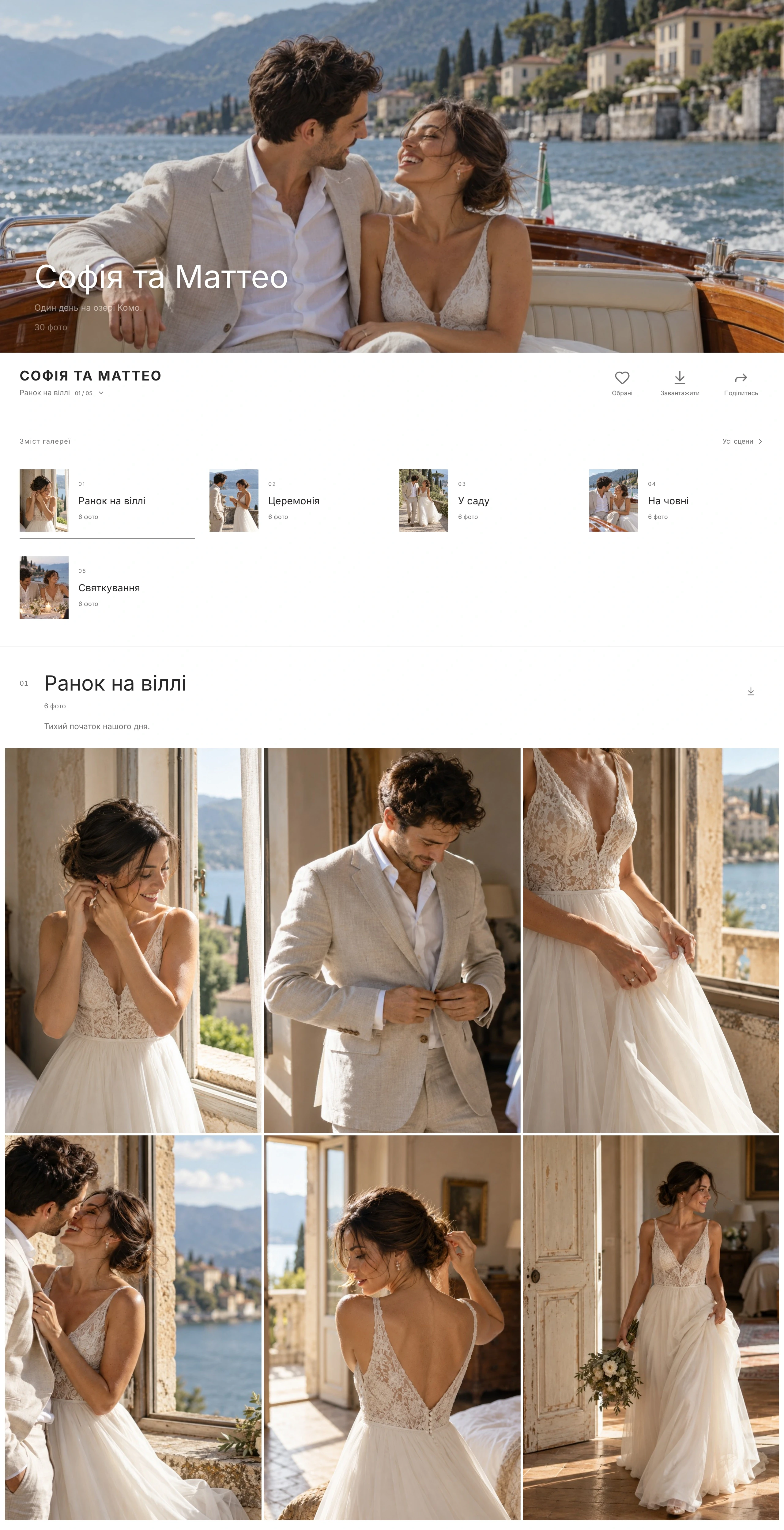
Quiet glass, soft corners and labelled icons — a gallery that reads at first sight.
Open the live galleryOnline galleries for photographers
Deliver photos and videos in a client gallery with your own design, selections, comments, and protection. Use galleries on their own, even if your website is already on another platform.
Create your first galleryVideo in mobile galleries
On a phone, a clip plays right in the grid when your client pauses on it. No Play button or separate player to open — motion becomes part of the story alongside your photographs.
You can turn automatic previews off in gallery settings. Browser policy, reduced motion or data-saving preferences may keep playback manual.
The preview starts when enough of the video is visible and it is near the center of the screen.
The video makes room for the next clip as soon as it leaves the viewing area.
Only one automatic preview plays at once. Open the video for full playback with sound.
2 gallery themes · 6 palettes
Two themes are the starting point for each shoot. Choose from 6 background and accent palettes, 12 fonts, and 10 cover options, including no cover. Adjust the grid and mobile design separately.
Light minimalism
Quiet glass, soft corners and labelled icons — a gallery that reads at first sight.
Open the live galleryPure frame
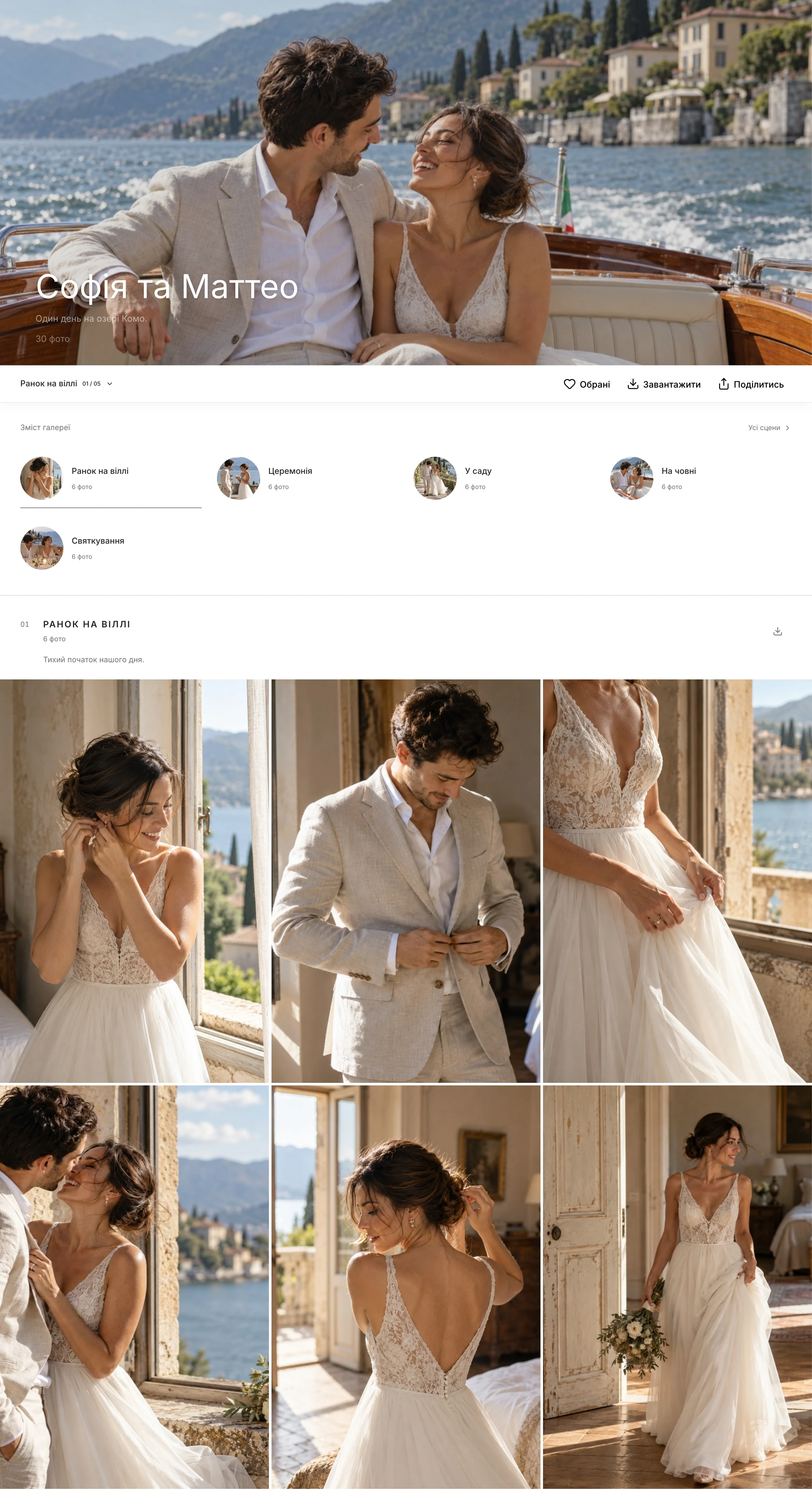
A dense edge-to-edge grid and almost no chrome: nothing but the photographs, and a bar that stays out of the way.
Open the live galleryBeyond basic delivery
Not decorative extras, but tools that protect the work, reduce back-and-forth, and give photographers control.
Show protected copies of photos and video with your signature. With protection enabled, gallery and ZIP downloads serve permitted watermarked copies.
Clients separate frames into Retouching, Print, or their own lists, then submit one final selection.
Choose a different mobile cover, framing, and heading style. Set columns and spacing separately for phones and computers.
See which photos clients view, select, and download. Detailed sessions, geography, and device data follow visitor-consent rules.
One product, two perspectives
Switch perspectives to see what Visuals handles before and after you send the gallery link.
From uploading a large shoot to final selections, protection, and analytics — all in one workspace.
Files go straight to the cloud, and unstable connections do not stop the whole job.
Hundreds of frames stay manageable without manual folder choreography.
The gallery continues the photographer's visual identity instead of feeling like a cloud-drive link.
Selections and revisions no longer scatter across screenshots, filenames, and voice messages.
Every person sees the right part of the shoot and downloads the quality you allow.
The work stays protected, while client response becomes visible instead of assumed.
Complete inventory
No roadmap promises: the list below contains only capabilities available in the current product.
Structure, publishing, and lifecycle
Photos, 4K video originals, RAW, and resilient large-shoot uploads
An individual design for each gallery on desktop and phone
Separate rules for viewing, guests, and parts of a shoot
Every piece of feedback stays with the right shoot
The right quality for clients and server-side content protection
From the overall trend to engagement on an individual frame
Scenes in online galleries
From bridal preparations to the last dance, keep the shoot in one gallery and divide it into scenes. Photographers can organise their files, while clients can find, view and download the moments they want.
How to set up scenes: a step-by-step video guide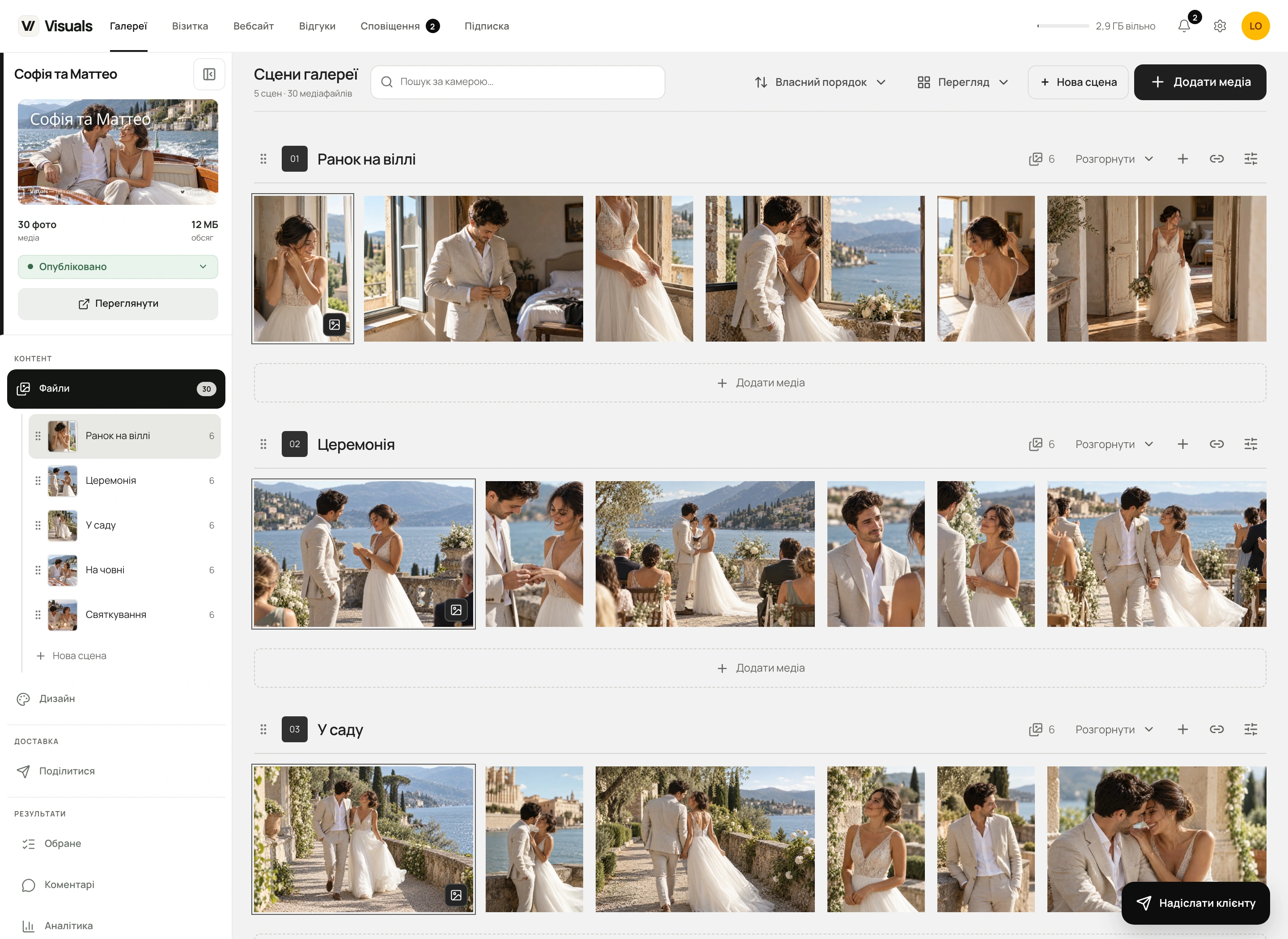
Create scenes by hand or from folder names during import. Add media straight to the right scene, change its name and description, pin a cover and choose the crop. Everything stays in the same gallery, with your design, favourites and access rules.
Each scene has its own “Add media” button. Drag files from your computer onto a scene in the workspace or sidebar: the highlight shows the upload destination. Folder import brings over the structure you have already prepared.
Select several photos and drag them together to another scene, or click “To scene”. There is no need to upload the originals again: the files, favourites, selections and related photo history stay intact.
Reorder scenes using the six-dot handle in the sidebar or workspace. Arrange photos separately in a custom order, or sort them by name or date. Collapse long scenes to move through the whole shoot more easily.
The first available photo becomes the cover automatically. You can pin another image and adjust its position and zoom. A scene cover does not change the cover of the whole gallery; its thumbnail is always there in the scene list.
Copy a scene’s address with one button so your client opens the start of the right section. Hide individual scenes from guests and control downloads. A scene link does not bypass the gallery PIN or other permissions.
Clients can save the accessible files from a selected scene: as an archive on their device, or through Google Drive or Dropbox when those options are available. Deliver just the ceremony, portraits or celebration while keeping your download permissions in place.
Names, descriptions, covers and photo counts help clients find their way before the whole gallery loads. On a phone or computer, they can move between scenes, open photos in the familiar Visuals viewer, add favourites and save what they need. Check the presentation in the “Design” tab before sharing.
They are sections within one client gallery, such as preparations, the ceremony, portraits and the celebration. Each scene can have a name, description, cover, its own crop and a direct link. They are not separate galleries.
Select the photos and drag them together to the target scene, or choose “To scene” in the bottom bar. Files are not transferred to the server again, and favourites, selections and related data are preserved.
Yes. When you import folders into a gallery, Visuals can create scenes from their names and assign the files to them. If you choose a folder using a specific scene’s button, its files go into that existing scene.
Yes, if the photographer allows downloads. The button next to the scene name opens saving for its accessible files only. A separate ZIP is prepared for the device; Google Drive and Dropbox may also be available in the dialog. The gallery’s general permissions and PIN still apply.
Saving photographs
Device, Google Drive or Dropbox, chosen inside the gallery. File sizes, transfer progress and retrying failed files without the extra steps.
Favorites & client selections
Clients pick frames right in the gallery. You decide whether to ask for email, how many lists and photos to allow, and whether selections can change after submission.

Straight answers
Yes, with automatic previews enabled: pause on a video in the grid. One clip plays muted and stops after leaving the viewing area. Tap to open the full player with sound. If the browser restricts autoplay or reduced-motion or data-saving preferences are enabled, manual playback remains available.
The photographer dashboard, website editor and starter website content support Ukrainian, English, Polish, German, French, Italian, Spanish, Dutch and Czech. Client galleries and business cards support these languages plus Turkish.
Each gallery has its own choice of 2 themes, 6 background and accent palettes, 12 fonts, and 10 cover options, including no cover. Adjust the crop, focal point, dimming, and heading typography; choose grid, masonry, or justified layouts, columns, gaps, image ratios, and grid width. Set a separate cover, crop, heading style, and grid for phones.
Clients save photos to favorites or named lists, leave comments, and submit a finished selection when you enable it. Copy selected filenames for Lightroom or Capture One, export a CSV, or download a ZIP of the chosen list.
Statistics show openings, unique browsers, visits and actions without linking them to a guest’s name or email. Visuals currently collects its own statistics automatically in every country without an initial prompt. Previously saved refusals and GPC and Do Not Track signals are respected. A browser is not necessarily one person, and blocked requests do not reach the report. Google Analytics and Meta Pixel have separate permission settings.
Visuals is a platform for photographers to build a public website, collect inquiries, and deliver branded online galleries with photos and videos to clients.
Yes. Online galleries are a standalone Visuals product with free and paid plans. Deliver shoots, customize the design, collect selections, and control downloads even if your website is already on another platform. You do not need to build a website in Visuals.
Yes. The builder has its own media library, forms, journal, booking calendars, service blocks, and more. Galleries simply make portfolio population faster.
3 GB for unlimited online galleries, client selections, and PIN protection, plus Website Starter with up to three pages on a Visuals subdomain and a Visuals badge. No card is required.
Yes. Connect your website domain with Website Pro, on its own or in a gallery bundle. Visuals verifies DNS, provides HTTPS, and generates canonical, robots.txt, and sitemap.xml. Custom gallery domains are planned.
Pages are server-rendered. You can set titles and descriptions for the site, pages, and posts, plus Open Graph, robots, canonical URLs, sitemaps, alt text, clean URLs, RSS, and structured blog data.
You can separately restrict viewing and downloads with PINs, set an expiration date, and apply server-rendered watermarks to photos and videos.
Galleries accept JPG/JPEG, PNG, HEIC/HEIF, WebP, TIFF, AVIF, GIF, BMP and JPEG XL, plus RAW on every plan, including Free. Video: MP4, MOV, M4V, WebM, MKV, AVI and 3GP with compatible codecs. Each photo or RAW file can be up to 500 MiB; each video up to 5 GB. Originals stay unchanged. Viewing copies are JPEGs, so GIF previews are static and transparency is flattened onto a background.
Yes. Photographers in the EU and other supported countries can pay for Visuals subscriptions through Paddle. The country of residence saved in your account determines the currency; the final total including tax is shown before payment. Monobank is the standard payment option in Ukraine; existing Monobank subscriptions stay with Monobank.
Gallery Start includes 30 minutes of Full HD video; Pro includes 30 minutes of 4K originals, Studio 60 minutes and Archive 120 minutes. This is the total duration stored across your account's galleries, not a monthly or per-file allowance. Deleting videos releases minutes. Each file can be up to 5 GB; browser playback is up to Full HD. Free does not include video uploads.
Start with what you need today
Start with an online gallery and 3 GB free, or choose a standalone website or better-value bundle.